> ## Documentation Index
> Fetch the complete documentation index at: https://docs.eigent.ai/llms.txt
> Use this file to discover all available pages before exploring further.
# Models (Local Model)
> Configure and deploy your preferred LLM models with Eigent.
## **Self-Host Model**
1. Configure your self-host model
First, you need to set up your local models and expose them as an **OpenAI-Compatible Server.**
```bash theme={null}
#Vllm https://docs.vllm.ai/en/latest/getting_started/quickstart.html#openai-compatible-server
vllm serve Qwen/Qwen2.5-1.5B-Instruct
```
```python theme={null}
#SGLang https://docs.sglang.ai/backend/openai_api_completions.html
from sglang.test.test_utils import is_in_ci
if is_in_ci():
from patch import launch_server_cmd
else:
from sglang.utils import launch_server_cmd
from sglang.utils import wait_for_server, print_highlight, terminate_process
server_process, port = launch_server_cmd(
"python3 -m sglang.launch_server --model-path qwen/qwen2.5-0.5b-instruct --host 0.0.0.0 --mem-fraction-static 0.8"
)
wait_for_server(f"http://localhost:{port}")
print(f"Server started on http://localhost:{port}")
```
```bash theme={null}
#Ollama https://github.com/ollama/ollama
ollama pull qwen2.5:7b
```
```bash theme={null}
# LLaMA.cpp server https://github.com/ggml-org/llama.cpp/tree/master/tools/server
./llama-server -m /path/to/model.gguf --host 0.0.0.0 --port 8080
```
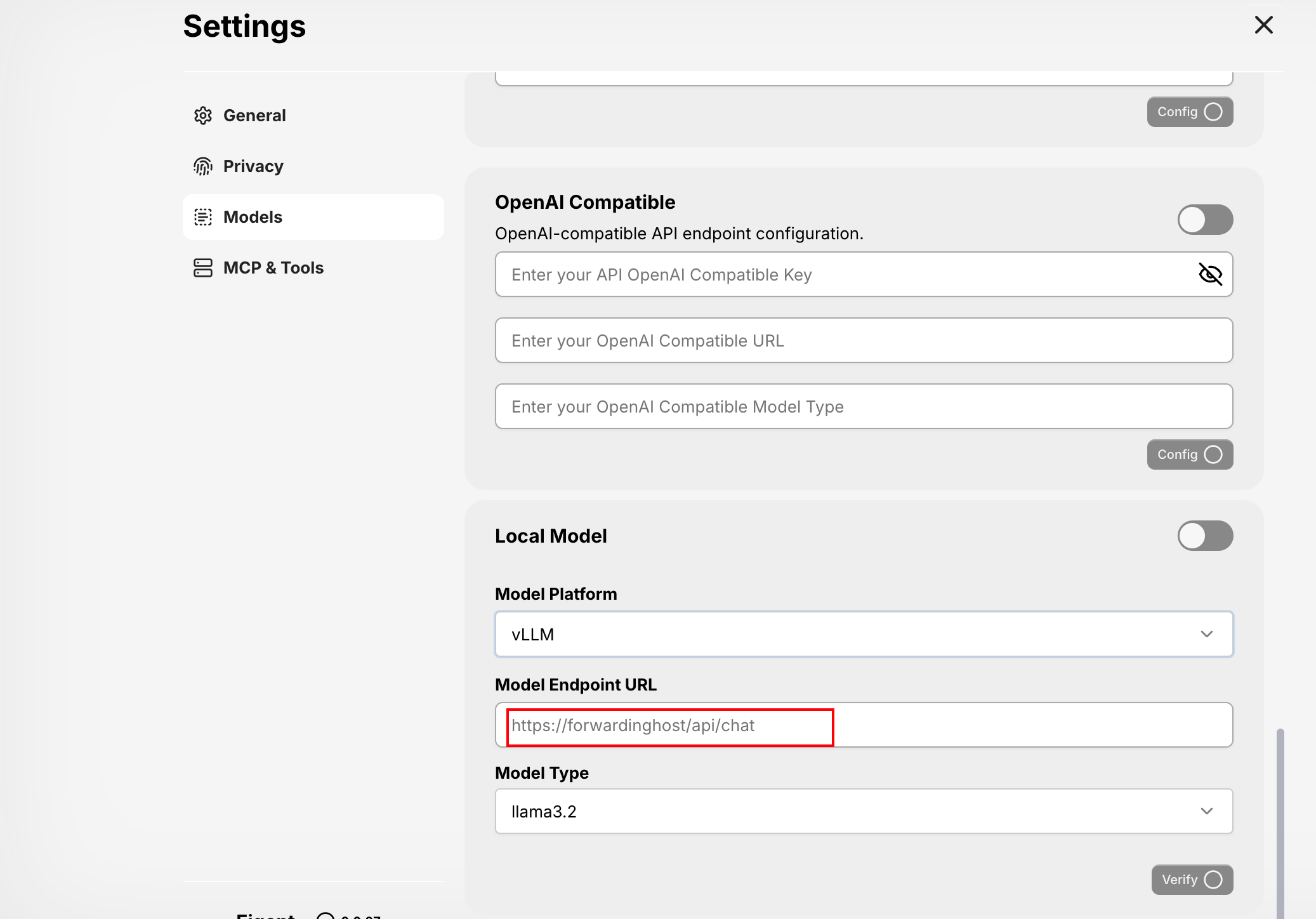
2. Setting your model
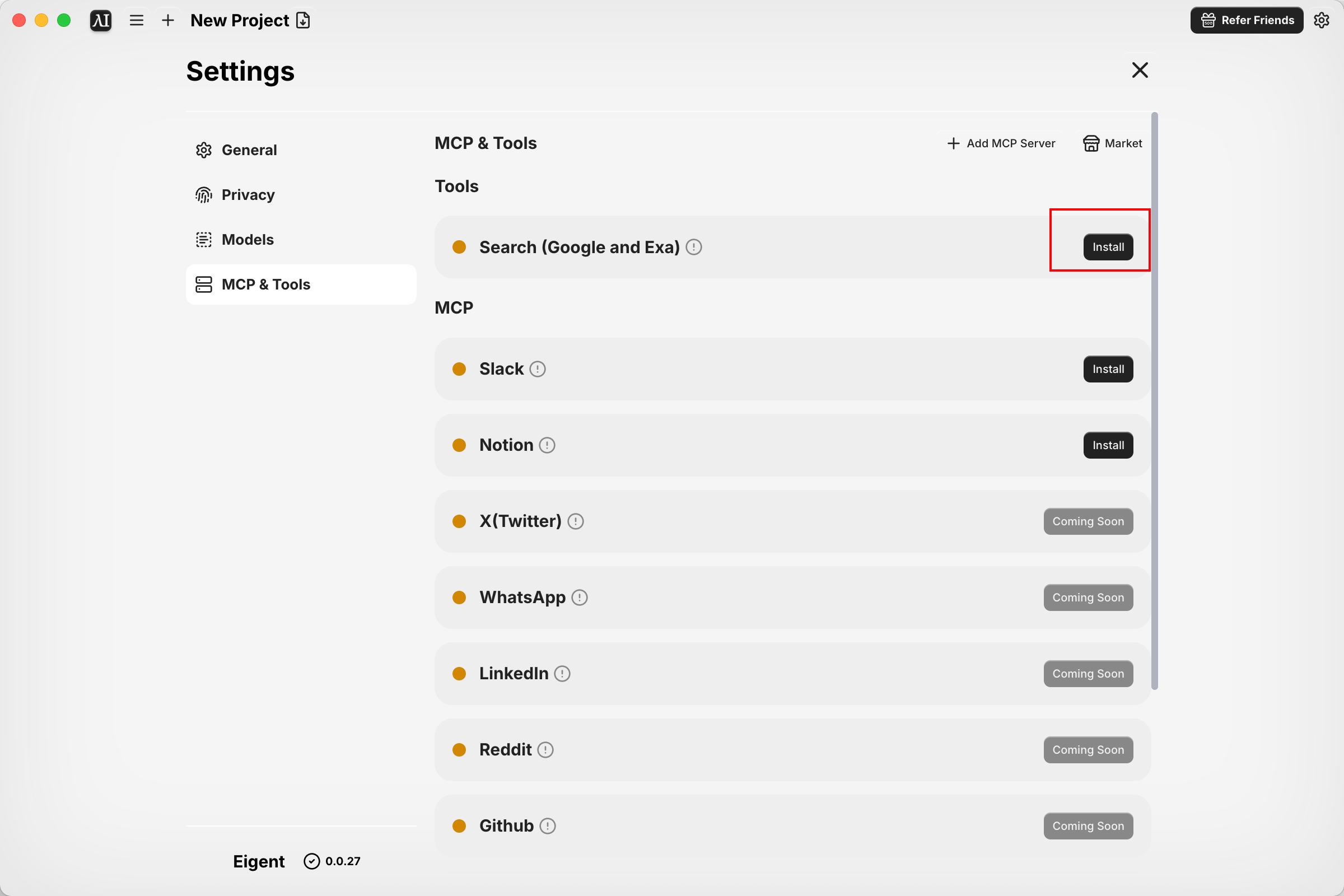
 3. Configure the Google Search toolkit
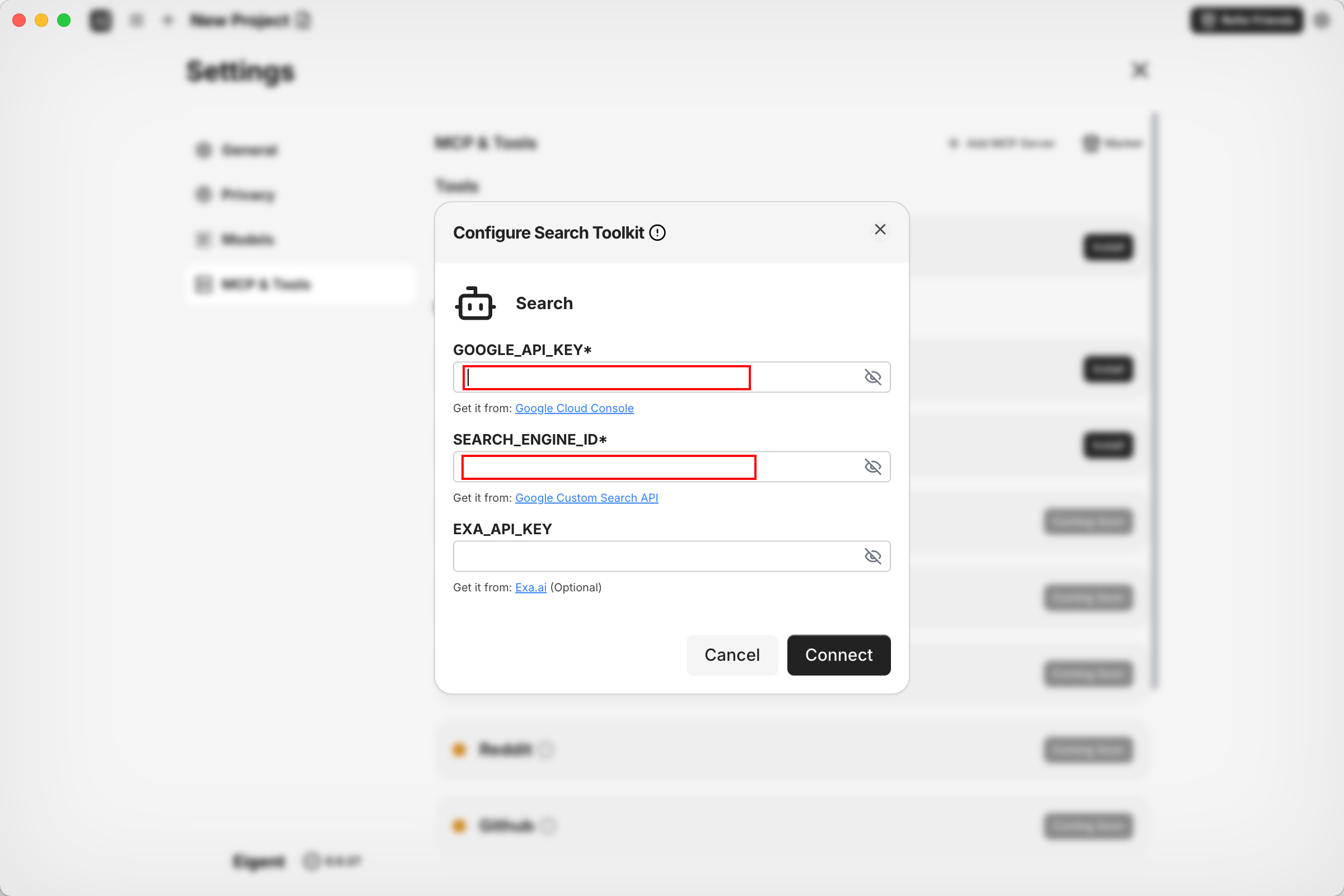 You can refer to the following document for detailed information on how to configure **GOOGLE\_API\_KEY** and **SEARCH\_ENGINE\_ID :** [https://developers.google.com/custom-search/v1/overview](https://developers.google.com/custom-search/v1/overview)
## **API KEY Reference**
Gemini: [https://ai.google.dev/gemini-api/docs/api-key](https://ai.google.dev/gemini-api/docs/api-key)
OpenAI: [https://platform.openai.com/api-keys](https://platform.openai.com/api-keys)
Anthropic: [https://console.anthropic.com/](https://console.anthropic.com/)
Qwen:[https://www.alibabacloud.com/help/en/model-studio/get-api-key](https://www.alibabacloud.com/help/en/model-studio/get-api-key)
Deepseek: [https://platform.deepseek.com/api\_keys](https://platform.deepseek.com/api_keys)
AWS Bedrock:[https://github.com/aws-samples/bedrock-access-gateway/blob/main/README.md](https://github.com/aws-samples/bedrock-access-gateway/blob/main/README.md)
Azure:[https://azure.microsoft.com/products/cognitive-services/openai-service/](https://azure.microsoft.com/products/cognitive-services/openai-service/)
You can refer to the following document for detailed information on how to configure **GOOGLE\_API\_KEY** and **SEARCH\_ENGINE\_ID :** [https://developers.google.com/custom-search/v1/overview](https://developers.google.com/custom-search/v1/overview)
## **API KEY Reference**
Gemini: [https://ai.google.dev/gemini-api/docs/api-key](https://ai.google.dev/gemini-api/docs/api-key)
OpenAI: [https://platform.openai.com/api-keys](https://platform.openai.com/api-keys)
Anthropic: [https://console.anthropic.com/](https://console.anthropic.com/)
Qwen:[https://www.alibabacloud.com/help/en/model-studio/get-api-key](https://www.alibabacloud.com/help/en/model-studio/get-api-key)
Deepseek: [https://platform.deepseek.com/api\_keys](https://platform.deepseek.com/api_keys)
AWS Bedrock:[https://github.com/aws-samples/bedrock-access-gateway/blob/main/README.md](https://github.com/aws-samples/bedrock-access-gateway/blob/main/README.md)
Azure:[https://azure.microsoft.com/products/cognitive-services/openai-service/](https://azure.microsoft.com/products/cognitive-services/openai-service/)