

What is BYOK?
Bring Your Own Key (BYOK) allows you to use your own API keys from various AI model providers with Eigent. Instead of relying on a shared service, you connect directly to providers like OpenAI, Anthropic, or Google using your personal API credentials. This gives you:- Full control over your API usage and billing
- Direct access to the latest models from each provider
- Privacy - your requests go directly to the provider
OpenAI Configuration (Example)
Step 1: Get Your API Key
- Visit the OpenAI API Keys page
- Click “Create new secret key”
- Copy the generated key (you won’t be able to see it again)
Step 2: Configure in Eigent
- Launch Eigent and go to Agent > Models
- Find the OpenAI card in the Custom Model section
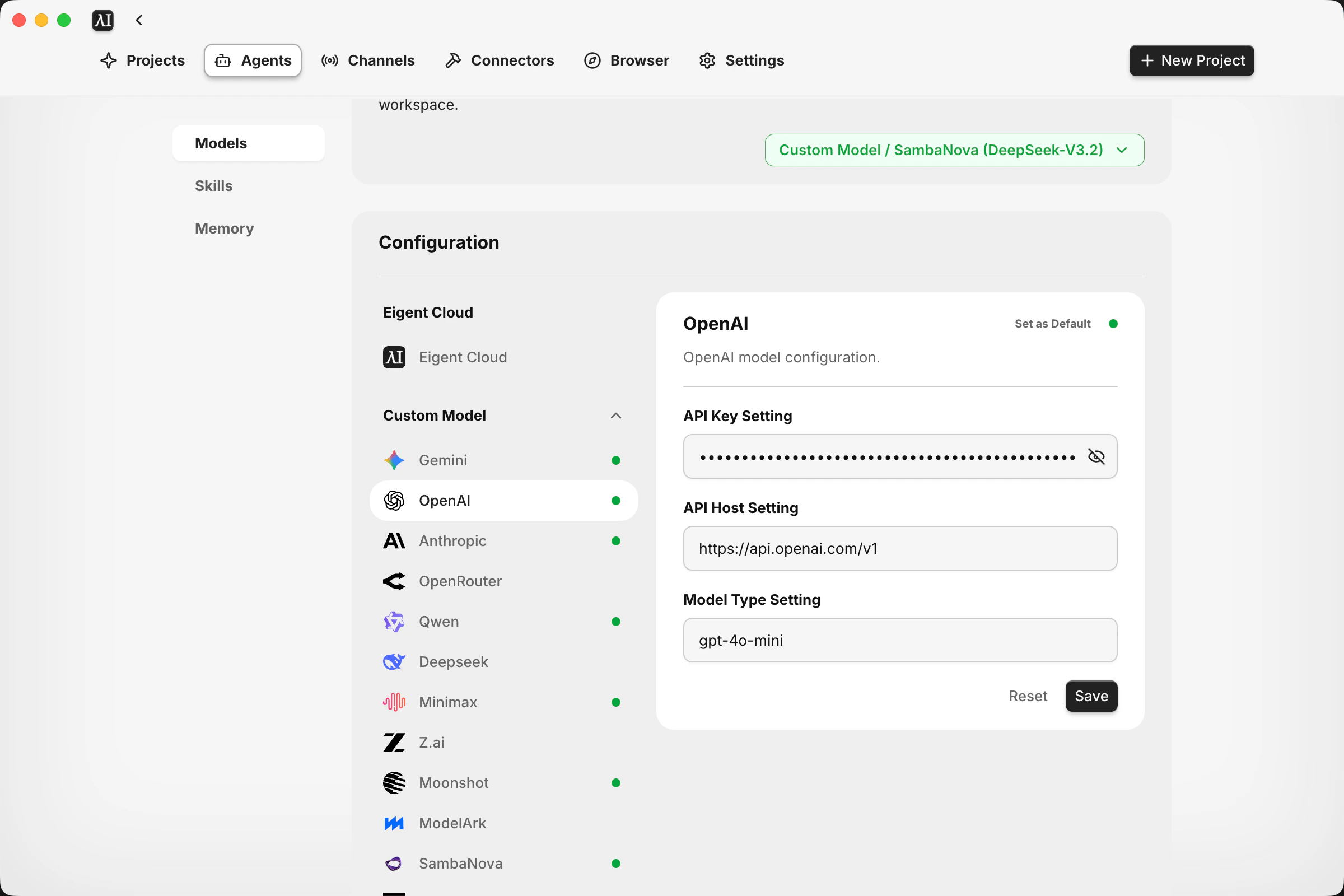
- Fill in the following fields:
| Field | Value | Example |
|---|---|---|
| API Key | Your OpenAI secret key | sk-proj-xxxx... |
| API Host | OpenAI API endpoint | https://api.openai.com/v1 |
| Model Type | The model you want to use | gpt-4o, gpt-4o-mini |
- Click Save to validate and store your configuration
- Click Set as Default to use this provider for your agents
Configuration Fields
| Field | Description | Required |
|---|---|---|
| API Key | Your authentication key from the provider | Yes |
| API Host | The API endpoint URL | Yes (pre-filled for most providers) |
| Model Type | The specific model variant to use | Yes |
| External Config | Provider-specific settings (e.g., Azure deployment name) | Only for certain providers |
Azure-Specific Fields
| Field | Description | Example |
|---|---|---|
| API Version | Azure OpenAI API version | 2024-02-15-preview |
| Deployment Name | Your Azure deployment name | my-gpt4-deployment |
Common Errors
When saving your configuration, Eigent validates your API key and model. Here are the errors you may encounter:| Error | Cause | Solution |
|---|---|---|
| Invalid key. Validation failed. | API key is incorrect, expired, or malformed | Double-check your API key. Regenerate a new key if needed. |
| Invalid model name. Validation failed. | The specified model does not exist or is not available for your account | Verify the model name is correct. Check if you have access to that model. |
| You exceeded your current quota | API quota exhausted or billing issue | Check your provider’s billing dashboard. Add credits or upgrade your plan. |
Supported Providers
Eigent supports the following BYOK providers:| Provider | Default API Host | Official Documentation |
|---|---|---|
| Google Gemini | https://generativelanguage.googleapis.com/v1beta/openai/ | Gemini API Docs |
| OpenAI | https://api.openai.com/v1 | OpenAI API Docs |
| Anthropic | https://api.anthropic.com | Anthropic API Docs |
| OrcaRouter | https://api.orcarouter.ai/v1 | OrcaRouter Docs |
| OpenRouter | https://openrouter.ai/api/v1 | OpenRouter Docs |
| Nebius Token Factory | https://api.tokenfactory.nebius.com/v1 | Nebius Token Factory Docs |
| Qwen (Alibaba) | https://dashscope.aliyuncs.com/compatible-mode/v1 | Qwen API Docs |
| DeepSeek | https://api.deepseek.com | DeepSeek API Docs |
| MiniMax | https://api.minimax.io/v1 | MiniMax API Docs |
| Z.ai | https://api.z.ai/api/coding/paas/v4/ | Z.ai Developer Docs |
| Moonshot | https://api.moonshot.ai/v1 | Moonshot AI Platform |
| ModelArk | https://ark.ap-southeast.bytepluses.com/api/v3 | ModelArk Docs |
| SambaNova | https://api.sambanova.ai/v1 | SambaNova API Reference |
| Grok | https://api.x.ai/v1 | xAI Docs |
| Mistral | https://api.mistral.ai | Mistral API Docs |
| AWS Bedrock | https://bedrock-mantle.us-east-1.api.aws/v1 | AWS Bedrock Docs |
| AWS Bedrock Converse | https://bedrock-runtime.us-east-1.amazonaws.com | Bedrock Converse API |
| Azure OpenAI | (user-provided) | Azure OpenAI Docs |
| Baidu ERNIE | https://qianfan.baidubce.com/v2 | Baidu Qianfan Docs |
| OpenAI Compatible | (user-provided) | For custom endpoints (e.g., xAI, local servers) |
Tips
- Keep your API key secure - Never share or expose your API key publicly
- Monitor usage - Check your provider’s dashboard regularly to track costs
- Use appropriate models - Different models have different capabilities and pricing